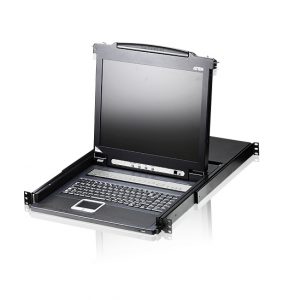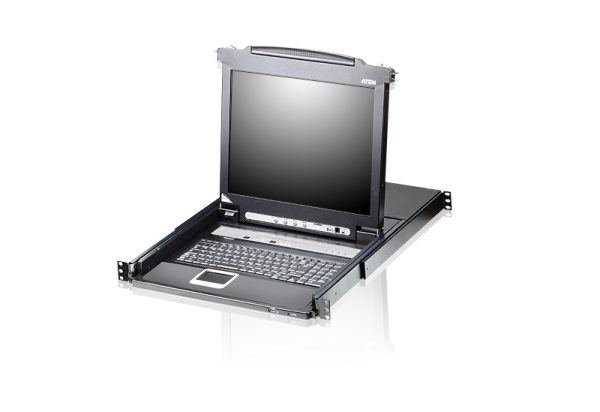


CL5708 -8-Port PS/2-USB VGA Single Rail LCD KVM Switch


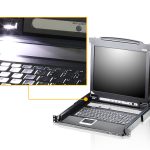
- Exclusive LED illumination light – designed by ATEN to illuminate the keyboard and touchpad to allow visibility in low-light conditions
- Integrated KVM console with 17″ or 19″ LED-backlit LCD monitor in a Slideaway™ housing
- Daisy-chain up to 31 additional units – control up to 256 computers from a single console
- USB port allows each computer to access USB peripherals*
- Description
- Vendor Info
- More Products
Description
Overview
The CL5708 Slideaway™ LCD KVM Switch is a control unit that allows access to multiple computers from a single PS/2 or USB KVM (keyboard, video, and mouse) console. A single CL5708 can control up to 8 computers. As many as 31 additional KVM switches can be daisy-chained to the CL5708, so that up to 256 computers can all be controlled from a single KVM console.
The CL5708 offers a space-saving, streamlined approach to KVM switch technology by integrating a keyboard, 17″ or 19″ LED-backlit LCD monitor, and touchpad in a 1U rack-mountable sliding housing.Note: Optional rack mount kits are available. For more information, refer to Compatible Accessories below or the link: LCD KVM Optional Rack Mount Kit CL5708M: 17″ LCD CL5708N: 19″ LCD CL5708FM: 17″ LCD with fingerprint reader
Package Contents
1x CL5708 LCD KVM Switch with standard Rack Mount Kit
2x Custom KVM Cable (VGA, USB; 1.8m/6ft)
1x Custom Console Cable (VGA, USB, PS/2; 27cm/0.88ft)
1x Firmware Upgrade Cable
1x Power Cord (AC Power Models)
1x User Instructions
Features
- Exclusive LED illumination light – designed by ATEN to illuminate the keyboard and touchpad to allow visibility in low-light conditions
- Integrated KVM console with 17″ or 19″ LED-backlit LCD monitor in a Slideaway™ housing
- Available with or without Fingerprint Identification Reader** – the unit is available as Fingerprint Identification Reader and NON-Fingerprint Identification Reader models
- Space saving technology – up to two consoles (one bus) control up to 8 computers
- Daisy-chain up to 31 additional units – control up to 256 computers from a single console (With compatible KVM Switches: ACS1208A, ACS1216A, CS1708A,CS1716A)
- Dual Interface – supports computers and console with PS/2 or USB keyboards and mice
- LCD module USB port allows each computer to access USB peripherals*
- LCD module rotates up to 115 degrees for a more comfortable viewing angle
- Multiplatform support – Windows, Linux, Mac, and Sun
- Supports multimedia USB keyboards for Windows, Mac and Sun
- Auto PS/2 and USB interface detection
- Keyboard and mouse emulation (PS/2 and USB) for smooth switching and simultaneous booting of multiple computers even when the console focus is elsewhere
- Additional hot-pluggable USB mouse port on front panel (also functions as a USB peripheral port)
- Superior video quality – supports resolutions up to 1280 x 1024 @ 75 Hz
- No software required – convenient computer selection via front panel pushbuttons, hotkeys and multilingual on-screen display (OSD) menus
- Auto-senses station’s position on daisy-chained installations; no need for manual dip switch setting; front panel led indicates station’s position
- Port names automatically reconfigured when station sequence is changed
- Two level password security – only authorized users can view and control computers
- Supports one administrator and four user accounts with separate profiles
- Auto Scan mode enables continuous monitoring of user-selected computers
- Broadcast support – commands from the keyboard can be broadcast to all available computers on the installation
- Hot pluggable – add or remove computers without having to power down the switch
- Beeper on/off via hotkey and OSD
- Firmware upgrades to all the chained KVM switches at the same time via the daisy-chain cable
- Optional rack mount kits available including easy installation options
- Keyboard Language support: English (US), English (UK), French, German, German (Swiss), Greek, Hungarian, Italian, Japanese, Korean, Russian, Spanish, Swedish and Traditional Chinese* The USB peripheral function only works with USB cable set connections. It will not work with PS/2 cable set connections.
**The fingerprint reader can be used as an alternate means of logging in to the switch. From 1 to 4 fingers can be scanned for each user and the administrator, with any one of the recorded fingerprints used to log in. 

Specifications
Vendor Information
- Vendor: admin
- No ratings found yet!